Final Project Reflection
For my final project, I chose to explore Agentic AI to recreate my Project One website, but with a twist. In real-world applications, a client could provide design direction in multiple different ways, and each method requires a unique set of steps and language to produce the vision. For this specific experiment, I wanted to examine two popular methods — visual references (imagine a client giving a mood board or website example they like, including images they want to include), and written direction only (no visual references except for image files). With ChatGPT as my chosen web developer, I got to work.
Pre-Experiment Notes & Preparation
Before I dive into the prompts, I wanted to make some blanket statements and transparent notes about my use of AI throughout the course. Once the semester started, I created two chats within ChatGPT — one for my media design course and one for this web development course. I used these chats for projects related to those classes as a quick way to do research, provide feedback, and proof my work. For web development, it proved extremely helpful as a resource for brainstorming ideas, figuring out why code didn’t work as planned, or learning a new technique in a conversational manner. I will add a very important disclaimer that I never used AI to create my work in either course; I merely used it as a tool to inform how I work and create.
I say all this to point out that in the web development chat I kept a long history of conversations about building Project One and checking code. None of these chats made it to the internal memory of the AI, so to keep the experiment as clean and neutral as possible, I created two new chats without any prior history. I did not want past conversations to inform how to proceed. I will also disclaim here that I brainstormed in the web development chat about how I could work through my final project, and it gave me a few prompts I could use to recreate websites (how meta!). I took this into consideration and ultimately used my own words and direction.
Prompt One, Take One (womp womp womp…)
Before starting the first prompt, I took screenshots of all three pages of Project One. I also pasted each image file from my OneDrive folder for Project One into the new chat prompt with the instructions. However, I was fully unaware that when you share from a OneDrive folder, it shares the ENTIRE folder, and ChatGPT took full inventory of Project One files. After I inspected the html files in my browser, I realized it was the exact same replication, and I got suspicious. I asked AI if it read files in OneDrive or recreated from the assets I provided, and it confirmed it read the original files and used the original HTML and CSS as the primary source to recreate the pages with a few deliberate changes. I quickly archived this chat and moved onto a new one with important changes.
Prompt One, Take Two (hooray!)
With the information I gathered from the first failed prompt, I moved all my files onto my desktop and started the process again. I pasted screenshots of each page and images needed, and provided the written instruction below:
          You are recreating an existing three-page website from the attached screenshots and image assets. only html and css is used.

          Your goal is visual and functional fidelity, not redesign. Preserve the original page structure, navigation, typography, imagery, parallax behavior, accessibility features, responsive behavior, and overall aesthetic as closely as possible.

          Global notes: The navigation bar and the image at the top of each page are sticky. The parallax feature starts with content under the navigation, including the text overlay of the images. The cursor is a silhouette of a tree instead of the traditional shape. Screenshots of pages are named "page [number]-[part]" to help with organization — for example, "page 1-1" is the first part of page 1, and "page 1-2" is the second part of page 1.

          Your output needs to be in the file structure below:

          css/=
          --custom.css
          images/
          --[image files]
          index.html (this is page one)
          page-two.html
          page-three.html

          Do not introduce frameworks, libraries, or new dependencies.
ChatGPT worked for a little over 5 minutes to recreate the pages, and the output was appropriately formatted in the requested structure. I proceeded to view the webpages, and they were (again) eerily like the original work, so I asked again to confirm it did not have any original HTML or CSS files to work from. Its response is below:
          Correct. There were no original HTML or CSS files in the workspace to work from.

          I recreated the site from the six screenshots and seven supplied image assets. The three HTML files and css/custom.css were written from scratch, so some unseen details—especially the exact original fonts, breakpoints, and wording not fully visible in the screenshots—were approximated.
And just for good measure, I also confirmed that the chat was not part of a project with prior history. Its response:
No—not beyond what was included in this task’s context.
I could see that the chat belongs to the Grad School project, plus its workspace instructions and any files currently available there. But I was not given earlier project chats, prior prompts, or a hidden history of how this website was originally made. For this task, I only had your prompt, screenshots, supplied images, and the workspace’s current contents.
I previously created a Grad School project to eventually connect work across different classes, but I had not yet built that out. I confirmed that this prompt was the first chat attached to the project, so there were no instructions, files, or workspace contents available before this.
Prompt One Results
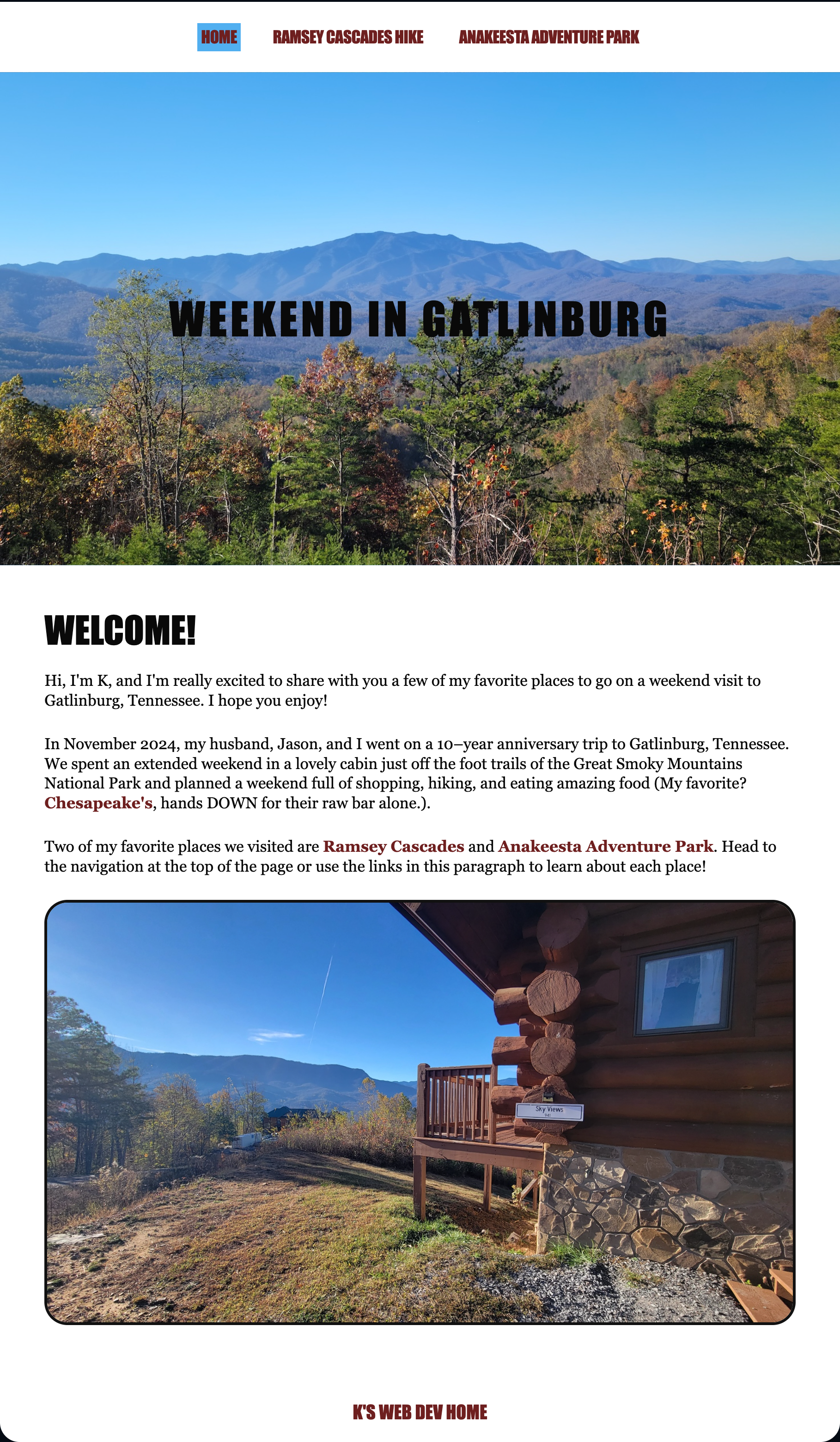
WOW, was I impressed. I honestly had no changes — the sites function exactly the way they should, user experience is preserved, fonts are similar, pictures are accurate, and navigation functions correctly. The sites are also fully responsive and mobile-friendly. I was most impressed by the hyperlinked text in each section. AI fully guessed on what those links should be and replicated them almost identically. The only link that was not active was K’s Web Dev Home, which is understandable.
I also just now noticed, as I am writing this reflection, that my Project One had a spelling error on page two (alongide instead of alongside). ChatGPT DID correct this spelling mistake. If I were to dive deeper into this, I would absolutely check to make sure it did not make any other copy changes.
The custom.css file does all the heavy lifting, and looking back on how I built Project One, I can see how effective and robust CSS can and should be. If I were to recreate this project using guidance from AI, I would absolutely reference these files to see where I could make improvements.
If I were to go back and make any adjustments to this prompt, I would ask AI to update the fonts and provide the correct link to my web dev page. Other than that, I feel like this prompt really nailed it in terms of recreation with little written direction. Onward!
Prompt Two
With the same knowledge in mind about OneDrive, I created a brand new chat (and made very sure it wasn’t attached to the Grad School project so it didn’t have that history of the first prompt), attached the images to the chat from my desktop, and then provided very detailed written instruction:
          Your job is to create a three-page website using html and css, images attached, and the information provided below. The file structure needs to be:

          css/
          --custom.css
          images/
          --[image files]
          index.html
          page-two.html
          page-three.html

          Global notes: each page includes a sticky nav and image at the top, and a parallax effect that starts with words over the sticky image. The cursor is a silhouette of a tree instead of the default shape (tree-cursor.png). There is a footer to each page, white background, and one centered link in the Oswald font, uppercase text treatment, text color is #65161b, default font size, named "K's Web Dev Home" which links to https://k-bryan.com/webdev/. Please use best judgement to make the pages mobile friendly and responsive, and accessible.

          The sticky navigation has three links spread equally across the top labeled "Home" (linking to index.html) "Ramsey Cascades Hike" (linking to page-two.html) and "Anakeesta Adventure Park" (linking to page-three.html). The font used is Oswald, all uppercase text treatment, the text color is #65161b, and there is an active nav treatment with a background color #4ba9f1. The background of the nav is white.

          index.html uses gatlinburg-mountains.jpg for the sticky image. The text over the image is "Weekend in Gatlinburg" in the Oswald font, black in color, all caps, centered horizontally and vertically over the image in 60 pixels, and serves as the h1. The content of the page starts below the image, background white, all text black, with the h2 in Oswald font, size 42 pixels, "Welcome!" The content is below in Montaga font, 18px:

          "Hi, I'm K, and I'm really excited to share with you a few of my favorite places to go on a weekend visit to Gatlinburg, Tennessee. I hope you enjoy!

          In November 2024, my husband, Jason, and I went on a 10-year anniversary trip to Gatlinburg, Tennessee. We spent an extended weekend in a lovely cabin just off the foot trails of the Great Smoky Mountains National Park and planned a weekend full of shopping, hiking, and eating amazing food (My favorite? [**Chesapeake's**](https://chesapeakes.com/), hands DOWN for their raw bar alone.).

          Two of my favorite places we visited are [**Ramsey Cascades**](https://k-bryan.com/webdev/project-one/page-two.html) and [**Anakeesta Adventure Park**](https://k-bryan.com/webdev/project-one/page-three.html). Head to the navigation at the top of the page or use the links in this paragraph to learn about each place!"

          There is a featured image, cabin-view.jpg, at the bottom, with rounded corners and a small black border. It is centered on the page and the size is roughly 50% of the page width.

          page-two.html uses ramsey-cascades.jpg for the sticky image. The text over the image is "Ramsey Cascades Hike" in the Oswald font, white in color with a thin black outline, all caps, centered horizontally and vertically over the image in 60 pixels, and serves as the h1. The content of the page starts below the image, background white, all text black, with the h2 in Oswald font, size 42 pixels, "The "4-Mile Trail" The content is below in Montaga font, 18px:

          "A funny story here — I was put in charge of finding a reasonably easy trail to hike the second day of our trip. I spent a few hours researching some popular, manageable day hikes in the Smoky Mountain area, and kept coming back to [**Ramsey Cascades**](https://www.nps.gov/thingstodo/hike-ramsey-cascades.htm). The trail information puts it at a moderate 8-mile roundtrip hike through old growth, ending at a spectacular view of the tallest falls in the national park. Count me in!

          The downfall here was my unpreparedness for ALL of it. I had never been on a hike this long or during the colder months, so I very much overdressed and overpacked. I ended up getting way too hot and carrying too much weight to sustain the hike, and we unfortunately had to cut our adventure short.

          All to say, the trail itself was absolutely gorgeous. It was mostly unpaved and hidden deep in the forest, and followed alongide a calm and babbling brook. The atmosphere was calm and serene, and paired with the fall foliage...chef's kiss. All in all, I really do recommend this hike, and I plan on going back to do it again (and make it to the top!)."

          There is a featured image, ramsey-trail.jpg, at the bottom, with rounded corners and a small black border. It is centered on the page and the size is roughly 50% of the page width.

          page-three.html uses anakeesta-view.jpg for the sticky image. The text over the image is "Anakeesta Adventure Park" in the Oswald font, black in color, all caps, centered horizontally and vertically over the image in 60 pixels, and serves as the h1. The content of the page starts below the image, background white, all text black, with the h2 in Oswald font, size 42 pixels, "Gatlinburg's Epcot" The content is below in Montaga font, 18px:

          "Gatlinburg really knows how to do tourism! You may have heard of Ober Gatlinburg, but just on the other side of the town is another mountaintop adventure, [**Anakeesta**](https://anakeesta.com/).

          Because we were here in November, Anakeesta was decorated to the brim with holiday festivities. Once we got to the top, we were greeted with music, incredible-smelling food, and activities for every age. They had a hot chocolate crawl, booths with seasonal foods found across America, performances, live music, treetop skywalks, mountain coasters, and so, SO much more. Very reminiscent of Disney's Epcot!

          One of the newest attractions at Anakeesta is called [**Astra Lumina**](https://anakeesta.com/astralumina/), and is the first location in the U.S. The experience starts at sundown and sends you on a botanical trail illuminated with themed installations using projection, light, and sound. The entire walk took us about an hour to complete, and we had an amazing time taking our time and enjoying the art around us."

          There is a featured image, anakeesta-treetop, at the bottom, with rounded corners and a small black border. It is centered on the page and the size is roughly 50% of the page width.
This time, AI took roughly 2 and a half minutes to recreate the webpages. The output was appropriately formatted in the file structure requested.
Prompt Two Results
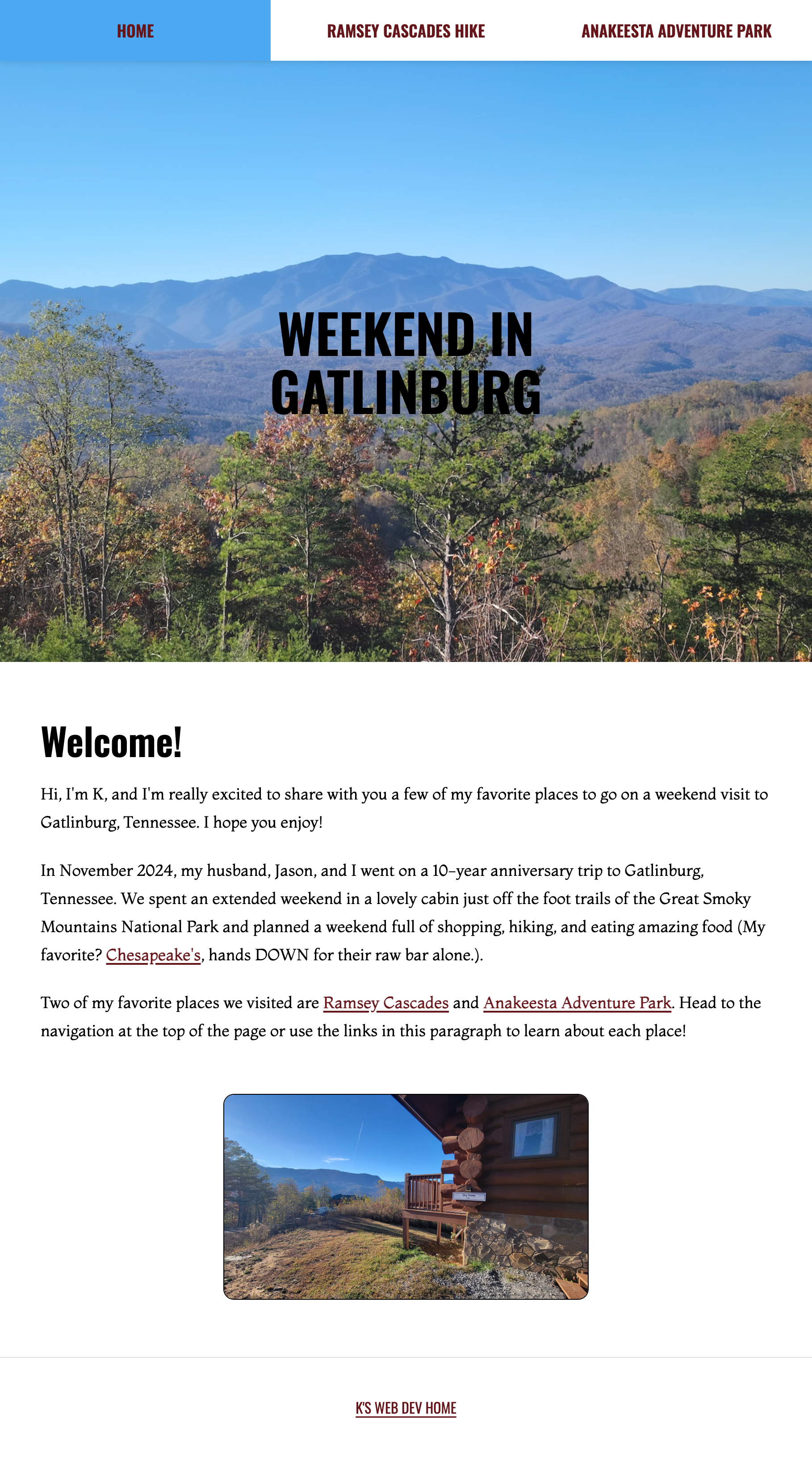
Again, I am SO incredibly impressed with the capabilities of AI. I imagined this particular prompt would produce sites that had a little more creative freedom, but I did not realize how effective just written instruction would be. I did notice one change immediately — it did not get the parallax effect correct. I asked it to update:
not bad! the only thing missing is the big image at the top of each page needs to be sticky as well. don't change anything with the navigation. the parallax effect includes the text overlay of the image and everything that follows.
ChatGPT’s response:
Updated! The complete hero—image and overlaid heading—now stays pinned beneath the unchanged sticky navigation while the following content scrolls over it.
After viewing the files, I noticed that the footer disappeared with the most recent change. My next prompt was a reiteration of the original prompt:
          I do not see the footer. Please add that in to each page.

          There is a footer to each page, white background, and one centered link in the Oswald font, uppercase text treatment, text color is #65161b, default font size, named "K's Web Dev Home" which links to https://k-bryan.com/webdev/. Please use best judgement to make the pages mobile friendly and responsive, and accessible.
ChatGPT’s response:
Fixed—the sticky hero was covering the existing footers. Each footer is now visible above it with the requested white background, centered uppercase Oswald link, and #65161b text.
After these final two revisions, I felt like the website was in a solid spot to be considered successful. The only design liberties taken were the active nav background color covering the entire section of the link space, and some minor responsiveness media queries. Everything else was, again, eerily like the original. The custom.css file still does the heavy lifting. I don’t know if this says anything about the simplicity of my website (baby web developer, not a lot of skills), or if it has to do with how I prompted AI.
Final Thoughts (and a few cherries on top)
I was truly blown away by the web dev capabilities of AI, specifically ChatGPT. Maybe more excited than I should have been (really, I went to my husband as soon as I finished the project and yelled, “LOOK HOW COOL THIS IS!”, but his response was less than enthused).
In all sincerity, though, this experiment and project taught me a lot about how AI can be used in a web development setting, whether it’s a tool to fully build out a draft webpage using direction from a client or a companion to improve an already existing site. However, production can’t be done independently. Human input and review is absolutely essential to creating something great. I don’t think it would have done as well had I not provided the actual image files the first time, nor would the second prompt have been acceptable if I delivered it back to a client without reviewing it for the parallax and footer errors.
Cherry #1: I took direction from Tyler (thank you!) and decided to put the same written prompt into Claude to see if the results were any different (prompt two, no screenshots). I did not include these results in the main project website, but I wanted to note here that Claude did better developing than ChatGPT in this instance. It got the parallax and footer on the first try (in fact, the hero image is the entire page background), and I did not have any major edits to the completed files. The custom.css file does the heavy lifting, and it also used comments in the file (nice job, Claude). It did NOT produce the files in the structure I asked for, so for it to be properly viewed in a browser, I had to create an images and css folder in the correct structure. Otherwise, I was thoroughly impressed once again.
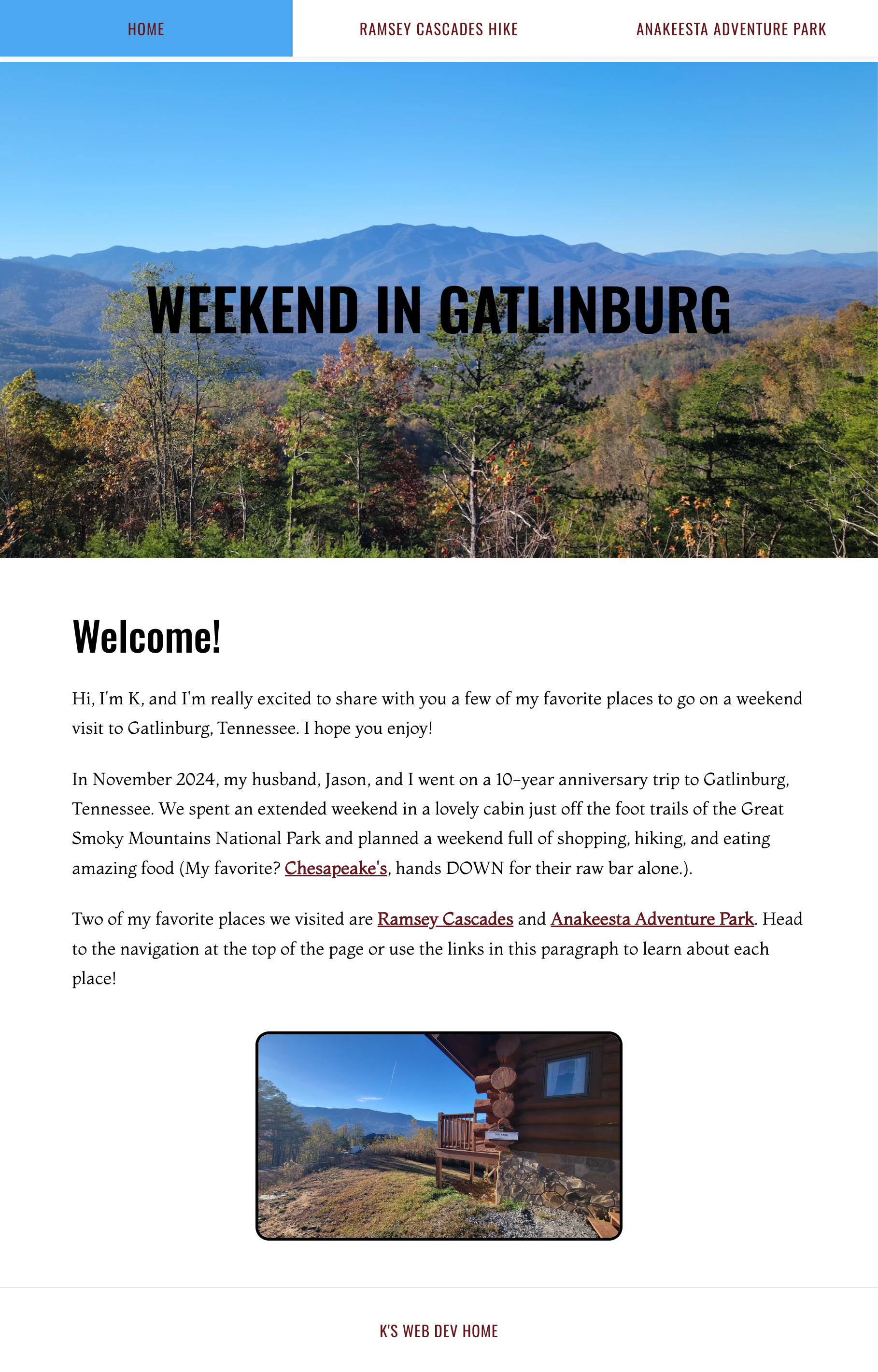
Cherry #2: As a fun, final addition to the final project and to push AI to create something completely from scratch, I created another new chat in ChatGPT, shared the previous two prompts as reference, and gave it this prompt:
          @Create Gatlinburg travel website @Recreate three-page website Using the history of these two chats, make an index.html home page that looks similar in style and treatments with a navigation that links to "Prompt One" (https://k-bryan.com/webdev/final-project/prompt-one/) and "Prompt Two" (https://k-bryan.com/webdev/final-project/prompt-one/). The same footer should exist on the page. No sticky hero image this time.

          The h1 should be "Agentic AI Exploration" in the same type treatment.

          For content, please write up your thoughts on the project, 200 words max. Make sure to note that the content was written by ChatGPT Codex via a prompt by me, Kay Bryan.
Yes, I did make an error in the second link, and ChatGPT pointed it out:
          Created the responsive home page with the requested Gatlinburg-inspired styling, navigation, footer, non-sticky hero treatment, and a 172-word reflection.

          I spotted one tiny gremlin in the brief: both navigation destinations use the prompt-one URL. I’m preserving the URLs exactly as supplied rather than silently inventing a prompt-two address; I’ll flag that in the handoff so it’s easy to correct if it was a typo.

          Note: both navigation links use the same prompt-one URL exactly as provided.
This is the final webpage you see as the home page to my Final Project. Disclaimer here, this is not my work, and it WAS created by ChatGPT as an experiment to see what it could do given history and context. AI created index.html and custom.css pages for use, and I uploaded these to my server (and corrected the links in the HTML file, thank you AI!).

Overall, I loved this process. I found it intriguing and eye-opening, and I walked away with insight into how I can incorporate AI into my personal and professional life.